Based on the product’s own screens, pricing and documentation · hands-on test protocol below
Leavo review
An all-in-one platform for leave, time tracking and shift planning, built for teams of roughly 10 to 300. What it does, what it costs, who it fits — and, kept separate, what we have not yet verified.
Leavo replaces the leave spreadsheet, the timesheet and the shift rota with one system: requests and approvals, a shared calendar, live balances, planned-versus-actual time with automatic overtime, shift publishing, collective-agreement compliance checks that can block a non-compliant save, and an AI assistant that answers "how many days do I have left?" and books the leave. It is free for teams under nine, $2.49 to $4.15 per user per month above that, and it is not a payroll system.
Disclosure: some software links on this page are affiliate links. If you sign up through one, we may earn a commission at no additional cost to you. We only recommend tools we have set up and used, and commission never affects placement or verdicts.
How this review was made. It is built from the product’s own screens (shown below, in both of its themes), its public pricing page, its programme terms and its published feature pages, all checked on the date above. It is not yet a hands-on test. Where a statement is the vendor’s claim rather than something visible on screen, it says so. The test protocol is at the end; results will be added when it has been run.
What Leavo is
Leavo describes itself as an all-in-one HR platform for leave, time and shifts, aimed at small and medium businesses — its own copy names 10 to 300 employees as the sweet spot where Excel breaks — plus startups and remote teams. Three modules share one data model: leave management, time tracking (it uses the Swiss-French term pointage), and shift planning. A compliance layer and an AI assistant sit across all three. The product ships in a dark and a light theme; both appear below.
The screens, one by one
Dashboard
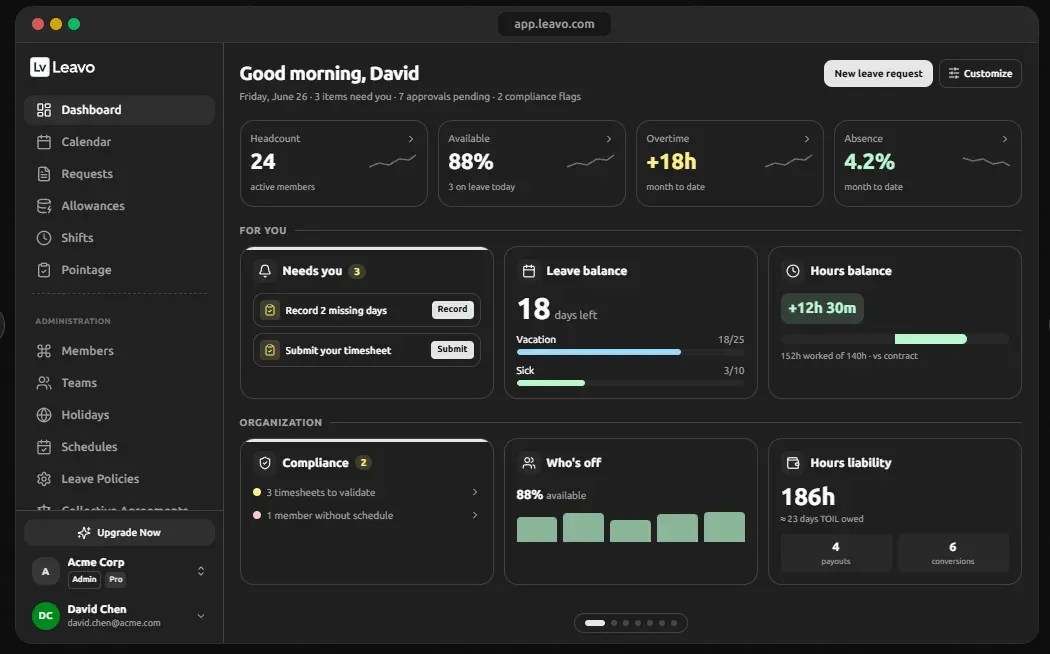
The landing view splits into "for you" and "organization". Personally: outstanding tasks (record missing days, submit a timesheet), a leave balance broken into vacation and sick with used-versus-allowance bars, and an hours balance showing hours worked against contract. For the organisation: headcount, percentage available today, month-to-date overtime and absence, compliance flags, who is off, and — the number this site cares about most — an hours liability figure expressed both in hours and in the days of TOIL it represents. That is the payout liability the law pages keep insisting you track, shown on the home screen.
Team calendar
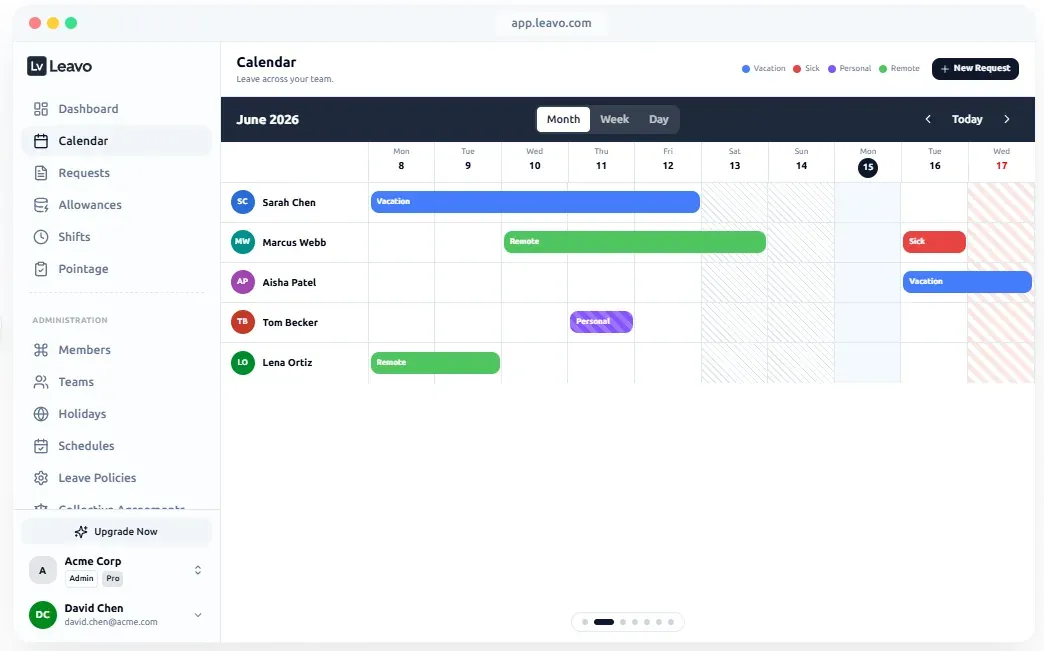
A month grid of the whole team, one row per person, with absences as colour-coded bars — vacation, sick, personal, remote — and week and day views. Weekends are hatched out, the current day is marked, and a public holiday is shaded on the right edge. This is the screen most small teams are actually replacing when they leave a shared spreadsheet or a wall planner: who is off, when, at a glance. Shown here in the light theme.
Requests
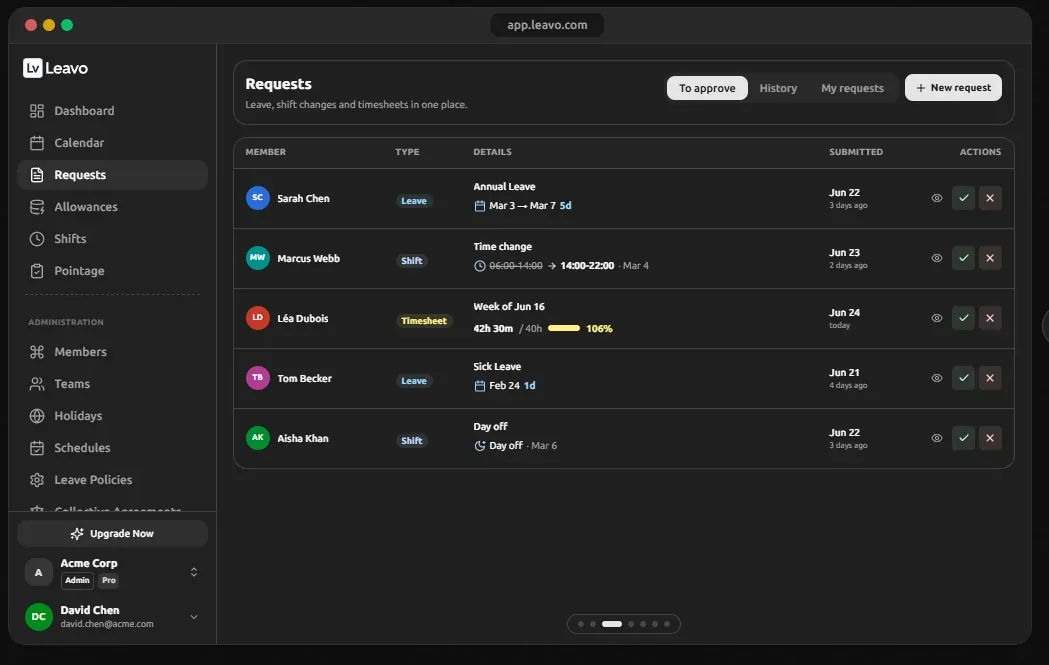
One queue for three kinds of request: leave, shift changes and timesheets. Each row shows the member, the type, the detail (a date range and day count for leave; old and new hours for a shift change; hours worked against contract for a timesheet), when it was submitted, and view, approve and reject actions. Tabs separate what needs approval from history and the approver’s own requests. The point of a unified queue is that a manager sees the whole week’s pressure in one place instead of three tools.
Time tracking
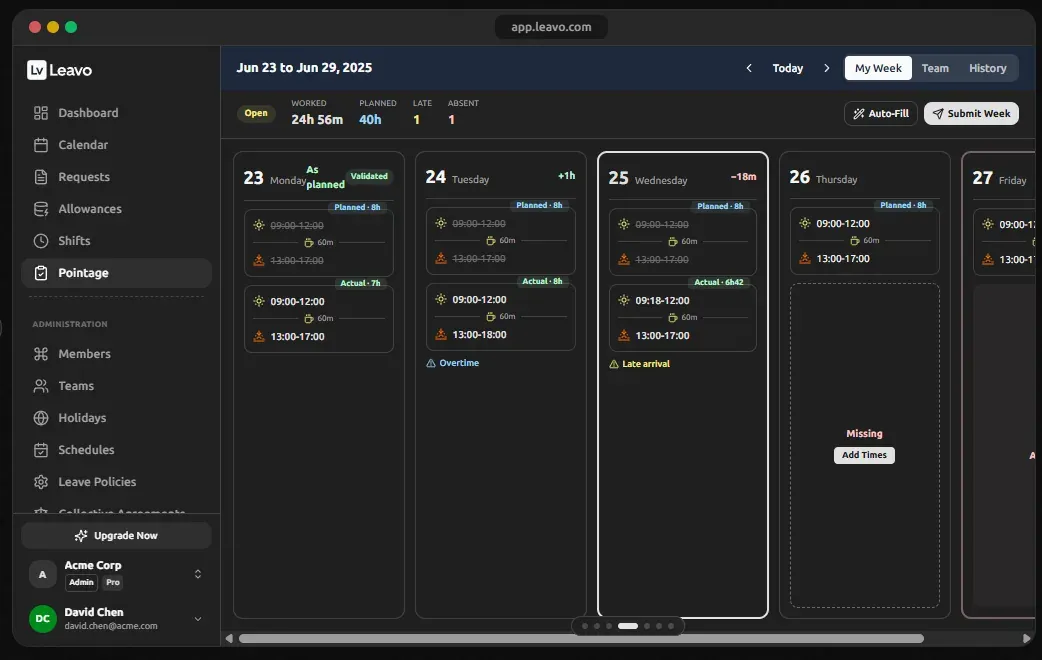
A week view with one column per day, each showing planned sessions against actual ones, and a state — validated, open, missing. The header totals worked against planned hours and counts late and absent days. Variances are flagged inline: an overtime marker on a day that ran to 18:00, a late-arrival flag on a 09:18 start, a "missing" placeholder with an add-times button on a day with no record. There is an auto-fill from the plan and a submit-week action, which is how a timesheet becomes a request in the queue above. This is the screen that produces the before/after audit log the vendor advertises.
Shift planning
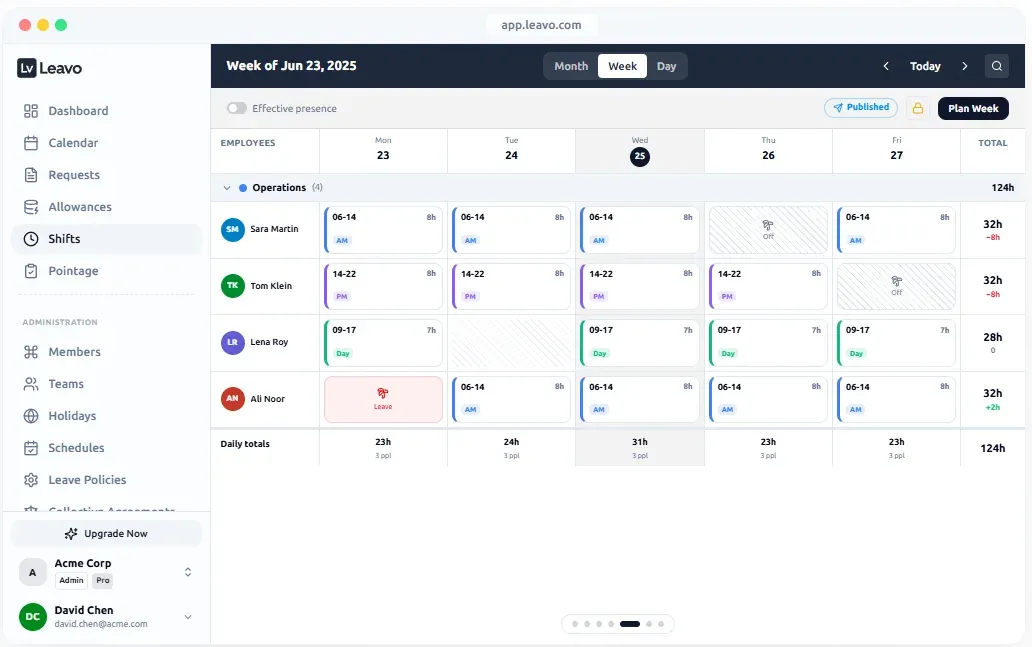
A week planner grouped by team — here "Operations", four people — with colour-coded shift blocks (a 06–14 morning, a 14–22 afternoon, a 09–17 day), each carrying its hours. Days off and approved leave appear inline in the same grid, so a planner cannot schedule someone who is away. Each row totals the week against contract (32h with −8h, 28h, 32h with +2h) and each day totals hours and headcount. The week carries a "Published" badge and a lock, with a "Plan Week" action — the draft → publish → auto-lock lifecycle the vendor describes, visible as a state. Light theme.
Collective agreements and compliance
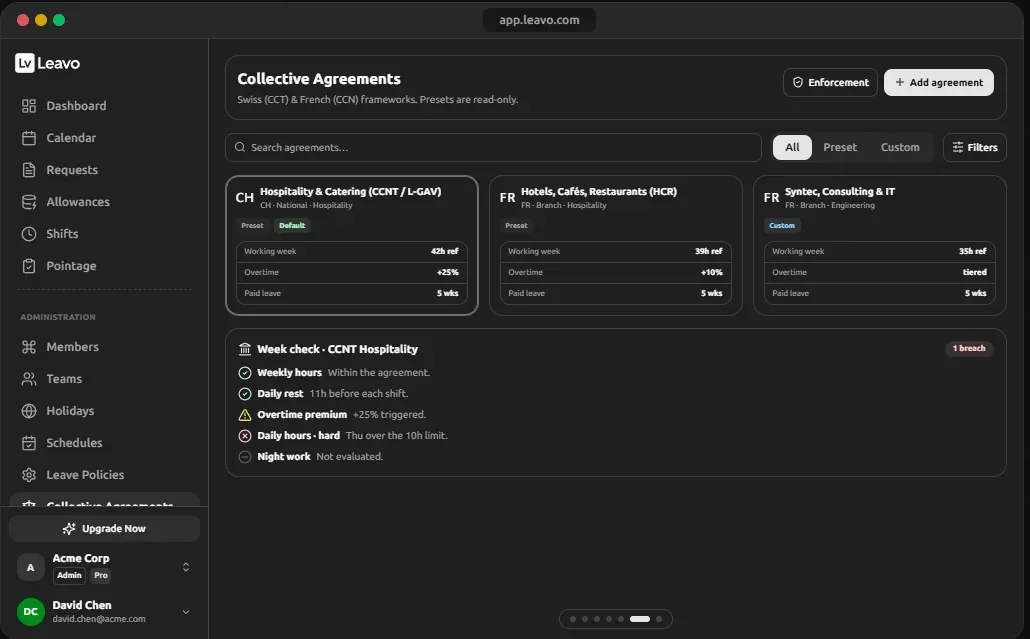
A library of agreement presets — Swiss hospitality (CCNT / L-GAV), French hotels-cafés- restaurants (HCR), French Syntec for consulting and IT — each carrying the reference working week, overtime treatment and paid-leave entitlement, alongside custom agreements. Below it, a weekly check against the active agreement: weekly hours, daily rest before each shift, overtime premium triggered, a hard daily-hours limit breached on one day, night work not evaluated.
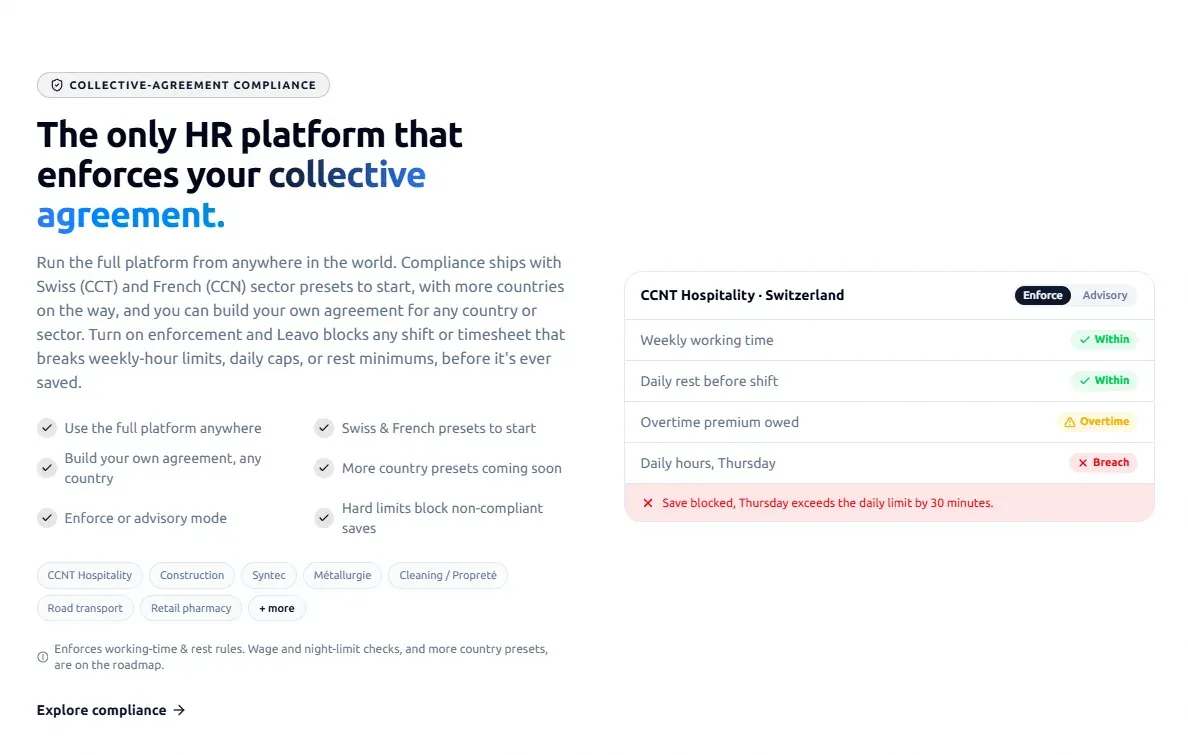
The vendor’s own feature page adds the part that matters operationally: compliance runs in enforce or advisory mode. In enforce mode a shift or timesheet that breaks a weekly-hour limit, daily cap or rest minimum is blocked before it is saved — the example shown is a save refused because Thursday exceeds the daily limit by 30 minutes. Presets listed include CCNT Hospitality, Construction, Syntec, Métallurgie, Cleaning, Road transport and Retail pharmacy, and you can build your own agreement for any country. Wage and night-limit checks are described as on the roadmap, not shipped. For anyone employing under a CCT or CCN this is the differentiating capability; nothing else in the small-team leave category does it.
AI assistant
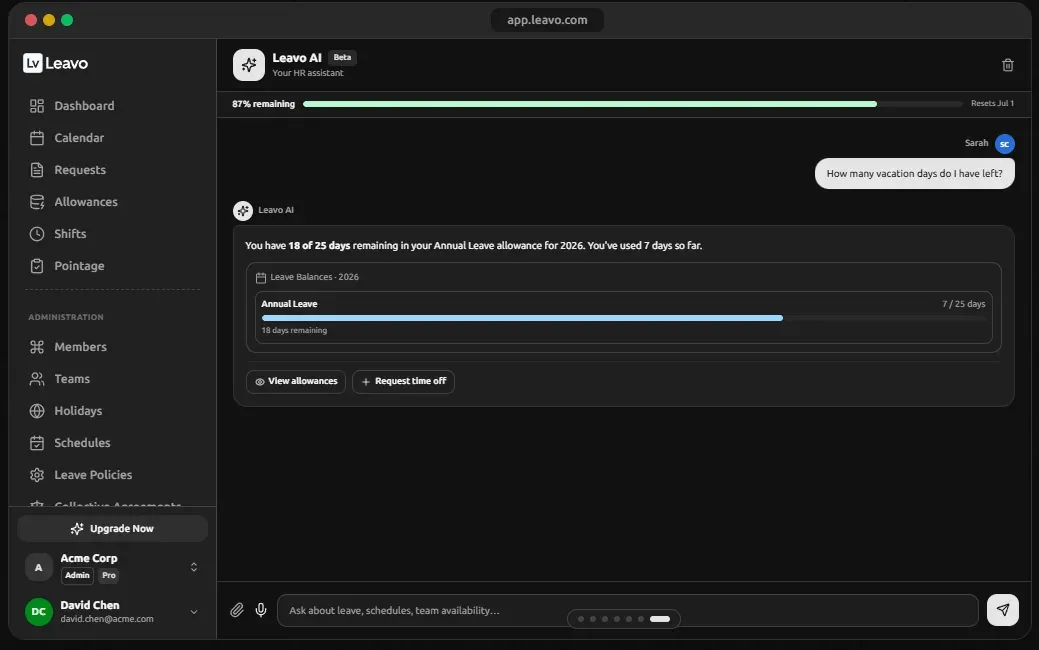
A chat pane with a monthly quota bar. In the screen shown, an employee asks how many vacation days she has left; the assistant answers from her live balance — 18 of 25 remaining, 7 used — renders the balance as a card, and offers two actions: view allowances and request time off. The vendor’s feature page goes further: the assistant takes voice as well as chat, books leave from a plain-language request ("book me 22 to 24 July off and check it doesn’t clash with my team") with a single confirmation, is described as role-aware and permission-safe, answers in the user’s language, and shows usage transparently. The practical effect is that the "how much leave do I have?" question — and the booking that follows it — stops landing on whoever runs HR.
Features as the vendor states them
Listed from Leavo’s published product pages. Observed on screen where noted; otherwise these are the vendor’s claims.
Leave management
- Half-day and hour-level requests
- Approval routes by team and reporting line (observed)
- Live balance recalculation, pending counted as used (observed)
- Team calendar with month, week and day views (observed)
- Carry-over automation
- Live public-holiday API, 100+ countries
- Year-versioned leave policies
Time tracking
- Morning/afternoon sessions with automatic overtime (observed)
- Day and week validation workflows (observed)
- Seven auto-detected discrepancy types
- Immutable before/after audit log
- Badge and clock-device support
- Contract vs planned vs worked reports
Shift planning
- Reusable shift types with colours (observed)
- Draft → publish → auto-lock lifecycle (published state observed)
- Leave and days off shown inside the rota (observed)
- Copy-week and bulk edit
- Time-change and day-off requests (observed in the queue)
- Month, week and day views
Compliance & AI
- Swiss CCT and French CCN presets with weekly checks (observed)
- Enforce or advisory mode; hard limits block non-compliant saves
- Build your own agreement for any country
- Overtime banking / TOIL conversion to days off
- AI assistant by chat and voice; books leave with one confirmation; role-aware
- Light and dark themes (observed)
- SOC 2 compliance, Swiss-made
Pricing, and what the tiers actually add
| Plan | Price | Per user (15 members) | What it adds |
|---|---|---|---|
| Free | $0 | — | For teams under nine members, per the vendor’s programme page |
| Professional | $448 / year | ~$2.49 / month | Higher AI quota; hours balance and overtime banking; unlimited members with billing that adjusts as you add them |
| Premium | $747 / year | ~$4.15 / month | Maximum AI quota with purchasable credit packs; multiple organisations; dedicated account manager; priority support |
All tiers include the team calendar, requests and approvals, leave policies, balance tracking, schedules, time tracking, audit trails and document management, per the pricing page. The 30-day trial needs no card, payment is by card or bank transfer, and there is no contract — cancel any time. In the dedicated-leave-tool category, $2.49 to $4.15 per user per month is mid-range; the free tier under nine members is the unusual part.
Who it fits, and who it doesn’t
A good fit
- Teams of roughly 10–300 that have payroll sorted and need leave, time and shifts done properly
- Anyone employing under a Swiss CCT or French CCN — enforce mode is unique in this category
- Shift-based operations (hospitality, retail, clinics) that need planning and time tracking together
- Teams under nine who want a real tool for nothing
Look elsewhere if
- You need payroll in the same system — pair it with payroll or pick a payroll-first tool
- You are US-only and want state PTO-payout rules automated; US-native HRIS tools go deeper there
- You employ people in countries where you have no entity — that is an employer-of-record problem, not a leave tool
- You are under ten people in one country with a simple policy — a spreadsheet is genuinely fine
What this review has not verified — and the test that will
Screens and documentation show what a product is designed to do. They do not show whether a carryover cap fires on the right date, what the audit log records when a policy is edited after approvals exist, or what the balance export actually contains. Those need time in the product. This is the protocol; each item will be marked with what was found when it has been run.
Test protocol — 15-person team
- Policy: 20 days annual accrual, monthly; five-day carryover cap at calendar year end; two-step approval (manager, then HR)
- One employee given a mid-year pay-rate change; one placed on unpaid leave for a month
- Measure: time from sign-up to a working policy
- Check: does the carryover cap apply on the correct date, and to the correct balance?
- Check: does accrual pause during unpaid leave?
- Check: does the audit log survive — and record — a policy edit made after approvals exist?
- Check: what does the balance export contain, and does it reconcile to the dashboard liability figure?
- Check: does a public-holiday calendar for a second country apply only to that group?
- Check: in enforce mode, is a shift that breaks the daily limit actually blocked at save?
Status: not yet run. This page will be updated with results and a new review date.
Verdict, within the limits above
On what can be seen and read, Leavo is a coherent, unusually complete tool for its price band: the three modules genuinely share one queue, one calendar and one set of balances, the liability figure on the dashboard is the right number to put in front of a small-business owner, and the collective-agreement enforcement has no equivalent among small-team leave trackers. The honest caveats are the ones the vendor states itself — it is not payroll, it is not an employer of record, and wage and night-limit checks are roadmap, not product. Free under nine members and a 30-day no-card trial mean the cost of finding out whether it fits your team is an afternoon.
Compare it with the alternatives in our software comparison, or head-to-head: Leavo vs Vacation Tracker, Leavo vs Timetastic, Leavo vs Calamari, and Leavo alternatives.
Common questions
Is Leavo really free?
Leavo publishes a Forever Free plan for teams of fewer than nine members, and a 30-day trial of the paid tiers with no card required. Paid plans are $448 a year (Professional) and $747 a year (Premium) for a 15-member team, with billing adjusting as members are added.
Does Leavo run payroll?
No. Leavo manages leave, time tracking and shift planning and produces the balances and audit trail payroll needs; it is not a payroll system. Teams that want payout to flow into a final paycheck automatically pair it with payroll software, or choose a payroll-integrated tool instead.
What languages does Leavo support?
Leavo’s site and product are published in English, French, Spanish and Italian, and the vendor states the AI assistant answers in the user’s language. A referral link resolves to the visitor’s language edition, so a French team lands on a French page.
Is Leavo suitable for a team spread across several countries?
For tracking, yes: it supports per-policy rules and public holidays for 100+ countries, so each group can follow its own entitlement and calendar. It does not employ people or run payroll abroad — that is an employer-of-record problem, covered in our hiring-abroad guide.
What has this review not verified?
Anything that requires running the product over time: whether a carryover cap fires on the correct date, how the audit log records a policy edit, what the balance export contains, and real-world setup time. The test protocol for those is published below and results will be added when it has been run.
Sources
- Leavo — product site (EN, FR, ES, IT editions), including the compliance and Leavo AI feature pages
- Leavo — pricing
- Leavo affiliate programme page on Reditus (free plan, SOC 2 and target-audience statements)
- Product screenshots in both themes supplied by the vendor to affiliates, reproduced above